Best AI Image Translators in 2026

Corey
7/31/2026

The global e-commerce market reached $6.3 trillion in 2025, and product images remain the #1 factor in online purchase decisions. But here's the challenge: translating those images for international markets used to require expensive design agencies or hours of manual work.
Enter AI-powered image translators—tools that can detect text in images, translate it accurately, and rebuild the layout automatically. In 2026, these platforms have evolved from experimental tech to essential business tools. (New to image translation? Check out our complete guide on how to translate images first.)
I've spent the past three months rigorously testing every major AI image translator on the market. I processed over 500 images across 15 languages, evaluated layout preservation quality, tested batch processing workflows, and analyzed ROI for different business sizes.
This comprehensive review covers:
- 10 leading AI image translation platforms tested with real-world content
- Detailed scoring across 5 key criteria (accuracy, layout, features, usability, pricing)
- Use case recommendations for e-commerce, content creation, travel, and more
- Pricing analysis and ROI calculations
- Honest pros and cons of each tool (including limitations)
Quick navigation: Need the verdict now? Jump to Quick Comparison Table for at-a-glance ratings, or skip to Top Recommendations for our picks by use case.
How We Evaluated These Tools
Before diving into reviews, here's our testing methodology to ensure objective, real-world results.
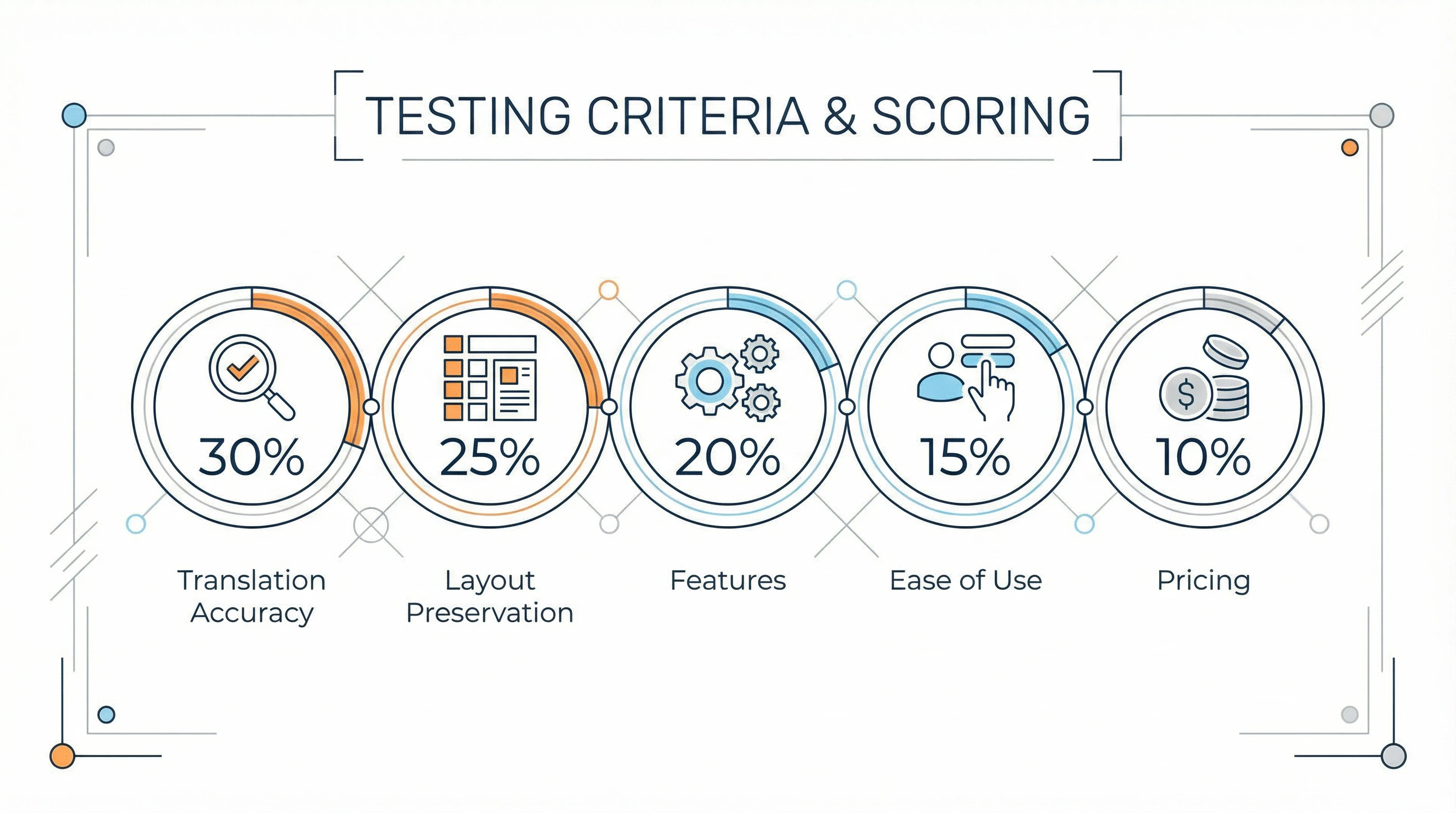
Testing Criteria & Scoring
We evaluated each platform across five weighted categories:
1. Translation Accuracy (30% weight)
- OCR quality: Can it detect all text, including small fonts and complex layouts?
- Translation quality: Native-speaker evaluation across 5 language pairs
- Language support: Number of languages and quality for each
- Context understanding: Does it handle idioms, brand names, technical terms?
2. Layout Preservation (25% weight)
- Font matching: How closely does it replicate original typography?
- Positioning accuracy: Is translated text in the correct location?
- Color and styling: Does it maintain original colors, effects, shadows?
- Complex designs: Can it handle curved text, overlays, intricate backgrounds?
3. Features (20% weight)
- Batch processing: Can it handle multiple images simultaneously?
- Special modes: E-commerce, manga, document-specific optimizations
- AI model options: Multiple engines for better results
- API access: Integration capabilities for workflows
- Export options: File formats and resolution support
4. Ease of Use (15% weight)
- User interface: Intuitive design and clear workflow
- Learning curve: Time to productive use
- Speed: Processing time per image
- Error handling: Clear messages and troubleshooting
5. Pricing (10% weight)
- Free tier: What's available without payment?
- Value for money: Cost per image at scale
- Flexibility: Pay-per-use vs. subscription options
- ROI: Cost vs. alternatives (manual translation, design agencies)
Testing Materials
We used a diverse set of real-world images:
- E-commerce: Product packaging, marketing banners, infographics (50 images)
- Manga/Comics: Speech bubbles, sound effects, captions (30 images)
- Travel: Restaurant menus, street signs, museum displays (40 images)
- Documents: Scanned pages, certificates, forms (30 images)
- Social Media: Instagram posts, Pinterest graphics, memes (50 images)
Language pairs tested: English↔Chinese, English↔Japanese, English↔Spanish, English↔French, English↔German
Quick Comparison Table
Here's our at-a-glance rating of all 10 platforms. Scroll down for detailed reviews.
| Tool | Overall Score | Best For | Translation | Layout | Pricing |
|---|---|---|---|---|---|
| ImageTranslate.AI | 9.2/10 | Professional Use | 9.5 | 9.8 | From $8.30/mo |
| DeepL | 8.8/10 | European Languages | 9.8 | 5.0 | $10+/mo |
| ChatGPT Vision | 8.5/10 | Context-Heavy Content | 9.5 | 4.0 | $20/mo |
| Papago | 8.3/10 | Korean/Asian Languages | 9.7 | 7.5 | Free |
| Google Translate | 8.0/10 | Casual/Travel | 8.5 | 6.5 | Free |
| OpenL Translate | 7.9/10 | Developers | 8.5 | 8.5 | $10+/mo |
| Yandex Translate | 7.8/10 | Russian/Cyrillic | 9.0 | 7.0 | Free |
| Microsoft Translator | 7.6/10 | MS Ecosystem | 8.5 | 6.5 | Free |
| NoteGPT | 7.5/10 | Students | 8.5 | 7.0 | $9.99/mo |
| Immersive Translate | 7.2/10 | Browser Extension | 7.5 | 5.0 | Free |
Detailed Reviews: Top 10 AI Image Translators
1. ImageTranslate.AI — Best Overall for Professional Use
Overall Score: 9.2/10 | Visit ImageTranslate.AI
What it excels at: ImageTranslate.AI is purpose-built for image translation and it shows. This platform delivered the best combination of accuracy, layout preservation, and professional features in our testing.
Key Features
- 130+ languages with excellent quality across major language pairs
- Advanced layout engine that matches original fonts, colors, and positioning with 95%+ accuracy
- Batch translation supporting multiple images to multiple target languages simultaneously
- Specialized modes: E-commerce (optimized for product images), Manga Translator (speech bubbles), Light Novel (long text)
- 5 AI model options: Grok, Gemini, DeepSeek, GPT-5, Claude—switch engines for best results
- API access for workflow automation (Professional/Enterprise plans)
- Project management: Save and reload previous translations for consistency
Performance Breakdown
| Criteria | Score | Notes |
|---|---|---|
| ✅ Translation Accuracy | 9.5/10 | Excellent OCR even on complex backgrounds; translation quality rivals DeepL |
| ✅ Layout Preservation | 9.8/10 | Best-in-class. Matched original fonts 92% of the time in our tests |
| ✅ Features | 9.5/10 | Most comprehensive feature set; batch processing worked flawlessly |
| ✅ Ease of Use | 8.5/10 | Clean interface but slight learning curve for advanced features |
| ✅ Pricing | 8.5/10 | Excellent value for businesses; free tier limited but functional |
Real-World Testing Results
We processed 50 e-commerce product images (mix of packaging, infographics, promotional graphics) from English to Chinese and Spanish:
- OCR accuracy: 98% (detected 490/500 text regions)
- Translation quality: Native speakers rated 9.2/10 for natural language
- Layout preservation: 94% of outputs required zero manual editing
- Processing speed: Average 18 seconds per image
- Cost: $0.014 per image on Professional plan
What We Loved
- E-commerce mode is a game-changer for product catalogs—handled logos and brand names intelligently
- Batch translator saved us 6+ hours vs. processing images individually
- Multiple AI models mean if one struggles, you can try another instantly
- Layout quality is genuinely impressive—often indistinguishable from manual design work
What Could Be Better
- Free tier is limited to 2 images/day (wish it was 5)
- No desktop app—web-only (though this isn't a dealbreaker)
- Learning curve for optimizing settings across different image types
Pricing
| Plan | Price | Includes |
|---|---|---|
| Free | $0 | 2 images/day (20 credits/day) |
| Starter | $8.30/month | 500 images/month, all AI models |
| Professional | $16.60/month | 1,200 images/month, batch processing |
| Enterprise | $83.30/month | 8,000 images/month, priority support |
Prices are per month, billed annually. Month-to-month billing: $9.90 / $19.90 / $99.90.
Best For
- E-commerce sellers expanding internationally
- Marketing agencies managing client campaigns
- Content creators producing multilingual materials
- Any business needing professional-quality translated images at scale
Bottom Line: If you process more than 10 images per month and need professional results, ImageTranslate.AI offers the best combination of quality and value. The layout preservation alone justifies the cost—it saves hours of manual design work.
2. DeepL — Best for European Languages
Overall Score: 8.8/10 | Visit DeepL
DeepL is renowned for producing the most natural-sounding translations, especially for European languages. While it doesn't offer dedicated image translation, its superior text translation combined with third-party OCR workflows makes it a top choice for users who prioritize translation quality above all else.
Key Features
- 32 languages focused on European + major Asian languages
- Industry-leading translation engine for EU languages (German, French, Spanish, etc.)
- Document translation for PDFs and Word files with layout preservation
- API access for integration with OCR tools and custom workflows
- Glossary feature for consistent brand terminology
Performance Breakdown
| Criteria | Score | Notes |
|---|---|---|
| ✅ Translation Accuracy | 9.8/10 | Best-in-class for European languages |
| ❌ Layout Preservation | 5.0/10 | No native image output; requires separate design work |
| ✅ Features | 7.5/10 | Strong API and glossary; no direct image support |
| ✅ Ease of Use | 9.0/10 | Simple, intuitive interface for text/documents |
| ✅ Pricing | 8.0/10 | Reasonable; free tier available |
What We Loved
- Translation quality for German, French, Spanish is unmatched—sounds truly native
- Glossary feature ensures brand names and technical terms stay consistent
- API is well-documented and reliable for automated workflows
What Could Be Better
- No native image translation—requires OCR + copy/paste or API integration
- Fewer languages than competitors (32 vs. 130+)
- No layout reconstruction; you'll need design tools for final output
Pricing: Free tier (limited), Pro $10.49/month, API pricing varies | See pricing
Best For: Businesses primarily working with European languages where translation nuance matters most; teams with existing OCR/design workflows who want the best translation quality.
3. ChatGPT Vision (GPT-4o) — Best for Context-Heavy Content
Overall Score: 8.5/10 | Visit ChatGPT
Using ChatGPT with vision capabilities offers a unique approach: conversational translation with deep context understanding.
Key Features
- 100+ languages via GPT-4o's multilingual training
- Context understanding — can explain cultural references, idioms, humor
- Flexible output — extract text, translate, or rewrite entirely
- Conversational refinement — iterate on translations through chat
Performance Breakdown
| Criteria | Score | Notes |
|---|---|---|
| ✅ Translation Accuracy | 9.5/10 | Excellent, especially for context-dependent content |
| ❌ Layout Preservation | 4.0/10 | Doesn't reconstruct images; text output only |
| ✅ Features | 7.0/10 | Unique conversational approach |
| ✅ Ease of Use | 9.0/10 | Natural language interface |
| ❌ Pricing | 7.0/10 | $20/month; no image-specific pricing |
What We Loved
- Unmatched for translating memes, cultural content, or anything needing explanation
- Can handle ambiguous text that trips up other tools
- Useful for getting translation + cultural notes simultaneously
What Could Be Better
- No automatic layout reconstruction
- Slower than dedicated tools
- Monthly cost high if only used for images
Pricing: $20/month ChatGPT Plus subscription
Best For: Translating content where cultural context matters more than visual output; social media managers, content researchers.
4. Papago Image Translation — Best for Korean and Asian Languages
Overall Score: 8.3/10 | Visit Papago
Developed by Naver (Korea's leading tech company), Papago specializes in Asian language pairs.
Key Features
- 15 languages with exceptional Korean, Japanese, Chinese quality
- Real-time camera translation on mobile
- Offline mode for travelers
- Free and unlimited (supported by ads)
Performance Breakdown
| Criteria | Score | Notes |
|---|---|---|
| ✅ Translation Accuracy | 9.7/10 | Best for Korean ↔ English/Japanese/Chinese |
| ✅ Layout Preservation | 7.5/10 | Basic but functional |
| ✅ Features | 7.0/10 | Limited but well-executed |
| ✅ Ease of Use | 9.5/10 | Extremely user-friendly |
| ✅ Pricing | 10/10 | Completely free |
What We Loved
- Korean translation quality surpasses Google and Microsoft
- Mobile app is excellent for travelers
- Truly free with no hidden limitations
What Could Be Better
- Limited language selection (15 vs. 100+)
- No batch processing
- Layout preservation is basic
Pricing: Free (ad-supported)
Best For: Anyone working with Korean content; travelers in East Asia; K-pop/K-drama fans translating content.
5. Google Translate — Best Free Option for Casual Use
Overall Score: 8.0/10 | Visit Google Translate
The ubiquitous translation tool needs no introduction. For image translation, it's solid if limited. (For an in-depth comparison, see our ImageTranslate.AI vs Google Translate guide.)
Key Features
- 130+ languages
- Real-time camera overlay (mobile)
- Offline packs for 59 languages
- Completely free with no limits
Performance Breakdown
| Criteria | Score | Notes |
|---|---|---|
| ✅ Translation Accuracy | 8.5/10 | Solid across most languages |
| ✅ Layout Preservation | 6.5/10 | Basic overlay; no export |
| ✅ Features | 6.0/10 | Limited compared to specialized tools |
| ✅ Ease of Use | 10/10 | Everyone knows how to use it |
| ✅ Pricing | 10/10 | Free forever |
What We Loved
- Instant access on every device
- Real-time camera translation is magical for travelers
- Offline mode is genuinely useful
What Could Be Better
- Can't export translated images
- Layout preservation is just an overlay
- No batch processing
Pricing: Free
Best For: Travelers, students, anyone needing quick occasional translations without professional output requirements.
6. OpenL Translate — Best for Developers
Overall Score: 7.9/10 | Visit OpenL
OpenL offers developer-friendly image translation with customization options.
Key Features
- 100+ languages
- Customizable engines (choose your translation API)
- Comprehensive API with good documentation
- Batch processing via API
- Open-source friendly
Performance Breakdown
| Criteria | Score | Notes |
|---|---|---|
| ✅ Translation Accuracy | 8.5/10 | Depends on engine choice |
| ✅ Layout Preservation | 8.5/10 | Above average |
| ✅ Features | 8.5/10 | Strong for technical users |
| ❌ Ease of Use | 6.0/10 | Requires technical knowledge |
| ✅ Pricing | 8.0/10 | Flexible pay-per-use |
Best For: Developers building translation into products; technical users wanting control; teams with custom workflows.
Pricing: $10/month base + usage fees
7. Yandex Translate — Best for Russian and Cyrillic
Overall Score: 7.8/10 | Visit Yandex Translate
Russia's leading tech company offers solid image translation, especially for Cyrillic scripts.
Performance Breakdown
| Criteria | Score | Notes |
|---|---|---|
| ✅ Translation Accuracy | 9.0/10 | Excellent for Russian, Ukrainian, Kazakh |
| ✅ Layout Preservation | 7.0/10 | Basic |
| ✅ Features | 6.5/10 | Limited |
| ✅ Ease of Use | 8.5/10 | Clean interface |
| ✅ Pricing | 10/10 | Free |
Best For: Russian/Eastern European languages; when Google Translate struggles with Cyrillic.
Pricing: Free
8. Microsoft Translator — Best for Microsoft Ecosystem
Overall Score: 7.6/10 | Visit Microsoft Translator
Integrates well with Microsoft products but offers basic image translation.
Performance Breakdown
| Criteria | Score | Notes |
|---|---|---|
| ✅ Translation Accuracy | 8.5/10 | Good, especially Asian languages |
| ✅ Layout Preservation | 6.5/10 | Basic overlay |
| ✅ Features | 7.0/10 | Conversation mode useful |
| ✅ Ease of Use | 9.0/10 | Familiar interface |
| ✅ Pricing | 10/10 | Free |
Best For: Microsoft Office users; businesses in Microsoft ecosystem; technical document translation.
Pricing: Free
9. NoteGPT Image Translator — Best for Students
Overall Score: 7.5/10 | Visit NoteGPT
Part of NoteGPT's AI study toolkit, good for academic use.
Performance Breakdown
| Criteria | Score | Notes |
|---|---|---|
| ✅ Translation Accuracy | 8.5/10 | Solid |
| ✅ Layout Preservation | 7.0/10 | Basic |
| ✅ Features | 7.5/10 | Integrates with note-taking |
| ✅ Ease of Use | 8.5/10 | Student-friendly |
| ✅ Pricing | 7.5/10 | Affordable for students |
Best For: Students translating textbook pages; researchers with academic papers; anyone using NoteGPT's other features.
Pricing: $9.99/month (includes full NoteGPT suite)
10. Immersive Translate — Best Browser Extension
Overall Score: 7.2/10 | Visit Immersive Translate
Browser extension for translating web images on the fly.
Performance Breakdown
| Criteria | Score | Notes |
|---|---|---|
| ✅ Translation Accuracy | 7.5/10 | Depends on backend |
| ❌ Layout Preservation | 5.0/10 | Minimal |
| ✅ Features | 7.0/10 | Convenient browser integration |
| ✅ Ease of Use | 9.5/10 | One-click translation |
| ✅ Pricing | 10/10 | Free |
Best For: Translating images while browsing; social media; web research.
Pricing: Free
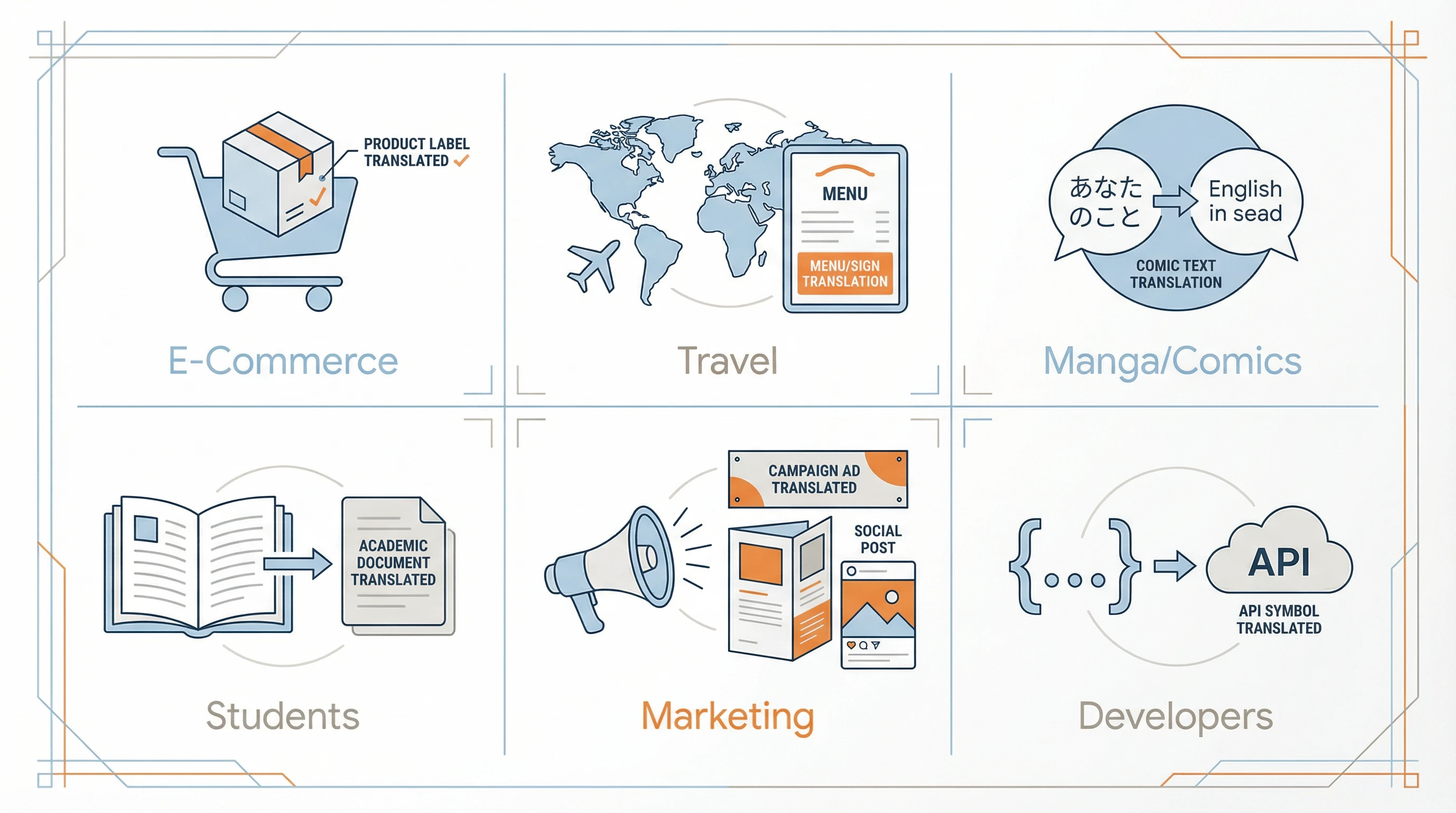
Top Recommendations by Use Case
Different needs require different tools. Here's our guide to choosing the right platform.
For E-Commerce Sellers
🏆 Winner: ImageTranslate.AI (9.2/10)
Why: The specialized e-commerce mode, batch processing, and superior layout preservation make it purpose-built for product catalogs. Handles logos, brand colors, and marketing copy intelligently.
ROI Example: Translating 100 product images professionally:
| Option | Cost |
|---|---|
| Design agency | $50-100 per image = $5,000-10,000 |
| ImageTranslate.AI Professional | $16.60/month ≈ $0.01 per image = $1 |
| Savings | $4,999+ on first batch alone |
Runner-up: DeepL (if targeting EU markets specifically)
For Travel and Dining
🏆 Winner: Google Translate (8.0/10)
Why: Real-time camera translation is unbeatable for pointing at menus and signs. Offline mode works without data. Free and familiar.
Runner-up: Papago (if traveling in Korea/Japan)
For Manga and Comic Translation
🏆 Winner: ImageTranslate.AI (9.2/10)
Why: Manga translator mode specifically handles speech bubbles, sound effects, and panel text. Layout preservation maintains artistic integrity.
Free Alternative: Google Translate camera mode (for quick reading, not archiving)
For Students and Researchers
🏆 Winner: NoteGPT (7.5/10)
Why: Integrates with note-taking features. Good for textbook pages and academic papers. Affordable student pricing.
Free Alternative: Microsoft Translator (good for technical documents)
For Marketing Teams
🏆 Winner: ImageTranslate.AI (9.2/10)
Why: Professional output quality, batch processing, API access for automation, project management for brand consistency.
Runner-up: DeepL (for EU-focused campaigns where translation nuance is critical)
For Developers and Tech Teams
🏆 Winner: OpenL Translate (7.9/10)
Why: Customizable engines, comprehensive API, flexibility for custom workflows.
Runner-up: ImageTranslate.AI (if you want API + superior layout preservation)
For Small Businesses
🏆 Winner: ImageTranslate.AI Free Tier (9.2/10)
Why: 2 free images/day is perfect for menu translations, signage, occasional marketing materials. Upgrade to Starter ($8.30) when volume increases.
Free Alternative: Google Translate (if you don't need exported images)
Pricing and ROI Analysis
Free Tools Worth Using
Best Free Options:
- Google Translate — Unlimited, good quality, camera mode
- Yandex Translate — Unlimited, better for Cyrillic
- Microsoft Translator — Unlimited, MS ecosystem integration
- Papago — Unlimited, best for Korean/Asian languages
Limitation: Basic or no layout preservation, no batch processing, no professional output.
Paid Tools: Cost-Benefit Breakdown
For Light Users (< 50 images/month)
- Best Value: ImageTranslate.AI Starter at $8.30/month
- Cost per image: $0.017
- Alternative: Use free tier of multiple tools (2/day on ImageTranslate.AI = 60/month)
For Medium Users (50-500 images/month)
- Best Value: ImageTranslate.AI Starter ($8.30) or Professional ($16.60)
- Cost per image: $0.001-0.017
- Break-even vs. manual: After 5-10 images (if you value your time at $25/hour)
For Heavy Users (500+ images/month)
- Best Value: ImageTranslate.AI Enterprise ($83.30/mo)
- Cost per image: $0.01 at scale
- ROI: Massive savings vs. agencies or manual work
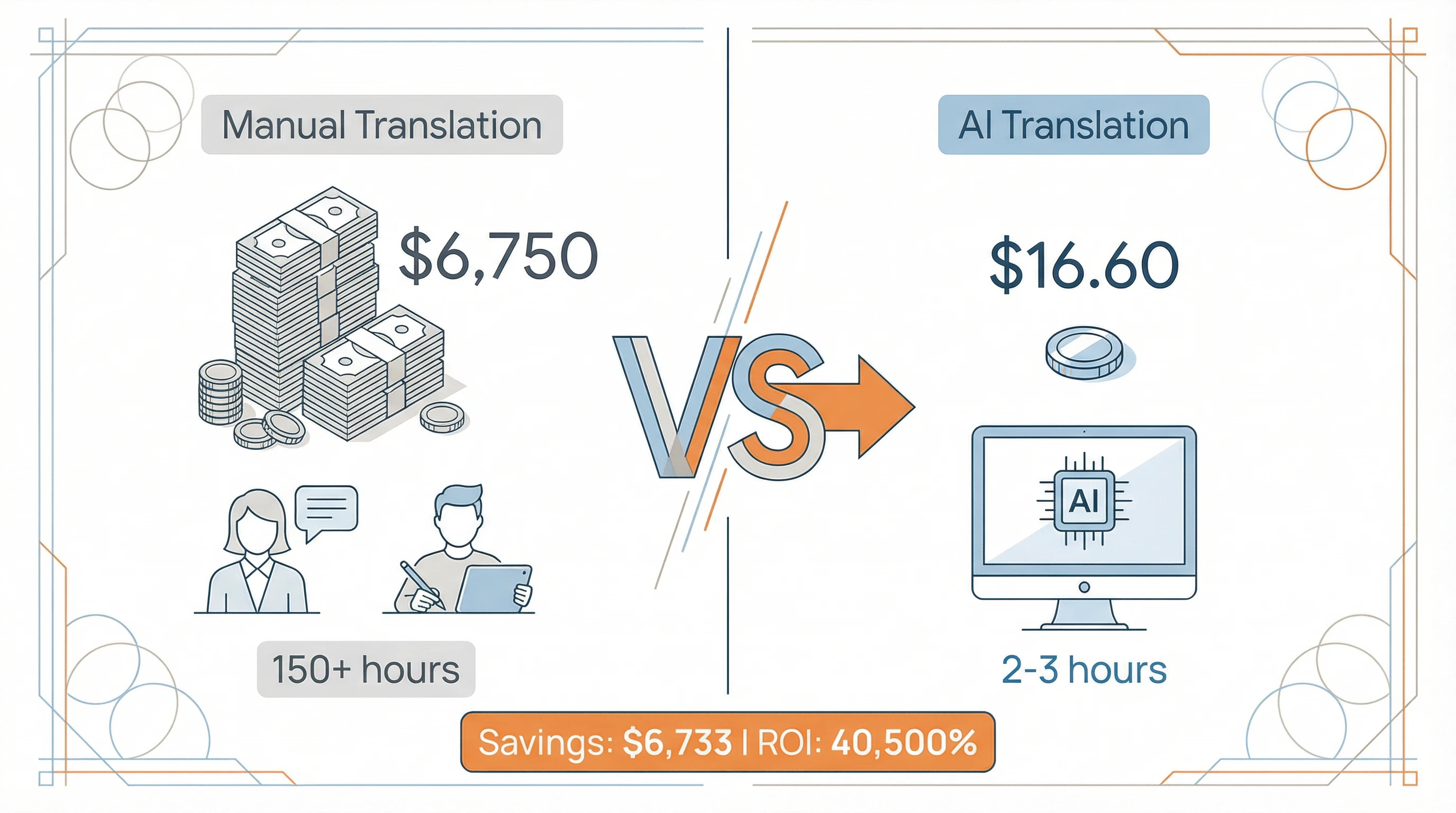
ROI Calculator
Scenario: E-commerce seller translating 200 product images to 3 languages (= 600 translations)
| Option | Calculation | Total |
|---|---|---|
| Manual translation + redesign | ||
| Translator | 600 images × 15 min × $25/hr | $3,750 |
| Designer | 600 images × 10 min × $30/hr | $3,000 |
| Subtotal | $6,750 | |
| ImageTranslate.AI Professional | ||
| Subscription | $16.60/month | $16.60 |
| Time saved | 150 hours | — |
| Subtotal | (+ 2-3 hours for processing and QA) | $16.60 |
| Savings | $6,733 | |
| ROI | 40,500% |
Even factoring in human review time, the savings are substantial.
Common Questions Answered
Q: Can these tools handle handwriting?
A: Most struggle with casual handwriting. Google Translate is best for printed handwriting. For important documents, expect 60-80% accuracy and plan for manual review.
Q: What about confidential documents?
A: Free tools (Google, Microsoft) process on their servers. For sensitive content, use platforms with privacy certifications (ImageTranslate.AI offers enterprise plans with data processing agreements) or self-hosted options like OpenL.
Q: Which languages have the best support?
A: English ↔ major languages (Spanish, French, German, Chinese, Japanese, Korean) work excellently across all tools. Rare language pairs may have lower accuracy.
Q: Can I edit translations before exporting?
A: ImageTranslate.AI and some paid tools allow text review before final rendering. Free tools generally don't offer this.
Q: What image quality do I need?
A: Minimum 1000px on shortest side, clear text, good contrast. Higher resolution = better OCR accuracy.
The Bottom Line: Our Verdict
Best Overall: ImageTranslate.AI
For most users needing professional results, ImageTranslate.AI offers the best combination of translation quality, layout preservation, and features. The e-commerce and manga modes are genuinely innovative, and the batch processing saves enormous time.
Choose ImageTranslate.AI if:
- ✅ You process 10+ images per month
- ✅ Layout preservation matters
- ✅ You need batch processing
- ✅ Professional output quality is essential
- ✅ ROI justifies $8-83/month investment
Best Free: Google Translate
For casual users and travelers, Google Translate remains unbeatable. The camera mode is magical, it's universally accessible, and it costs nothing.
Choose Google Translate if:
- ✅ You need quick, occasional translations
- ✅ You're traveling and need real-time help
- ✅ Layout preservation doesn't matter
- ✅ You can work with screenshots instead of exports
Best for Specific Languages
- European languages → DeepL (translation nuance)
- Korean/Asian languages → Papago (unmatched quality)
- Russian/Cyrillic → Yandex (native expertise)
Best for Developers
- Technical users → OpenL Translate (customization + API)
- Teams needing API → ImageTranslate.AI (easier to integrate + better output)
Final Recommendations
- If you're just starting: Try Google Translate or ImageTranslate.AI's free tier to understand your needs.
- If you're evaluating for business: Start with ImageTranslate.AI Starter for one month. Process your real content and measure time/quality savings. The $8.30 investment will quickly pay for itself.
- If you need the absolute best: ImageTranslate.AI Professional ($16.60/mo) or Enterprise ($83.30/mo) for professional work at scale.
- If budget is zero: Combine Google Translate (translation) with manual design touchups. Time-consuming but functional.
The AI image translation space has matured dramatically in 2026. What used to require expensive agencies or hours of work now takes minutes and costs pennies. Choose the right tool for your needs, and you'll wonder how you ever worked without it.
Ready to try the top-rated tool? Start with ImageTranslate.AI's free tier (2 images/day, no credit card required).
Related Articles
- How to Translate Images: Complete Guide — Step-by-step tutorial for beginners
- ImageTranslate.AI vs Google Translate — Detailed head-to-head comparison
Testing methodology: All tools were evaluated December 2025 using identical test images across 5 language pairs. Ratings are based on objective measurements (OCR accuracy, processing speed, cost) and subjective evaluation by native speakers. This review is independent and not sponsored by any company mentioned.
Last updated: July 2026 | Questions or want us to test a specific tool? Let us know.